
The door knows who's paid up.
Tick which membership plans open the door. Fitnito tells your door system to let a member in while their membership is active, and to lock them out when it's paused, canceled or unpaid. Past due is your call.
Premium on paid plans and the trial · Works with a door system that accepts a signed web address from Fitnito
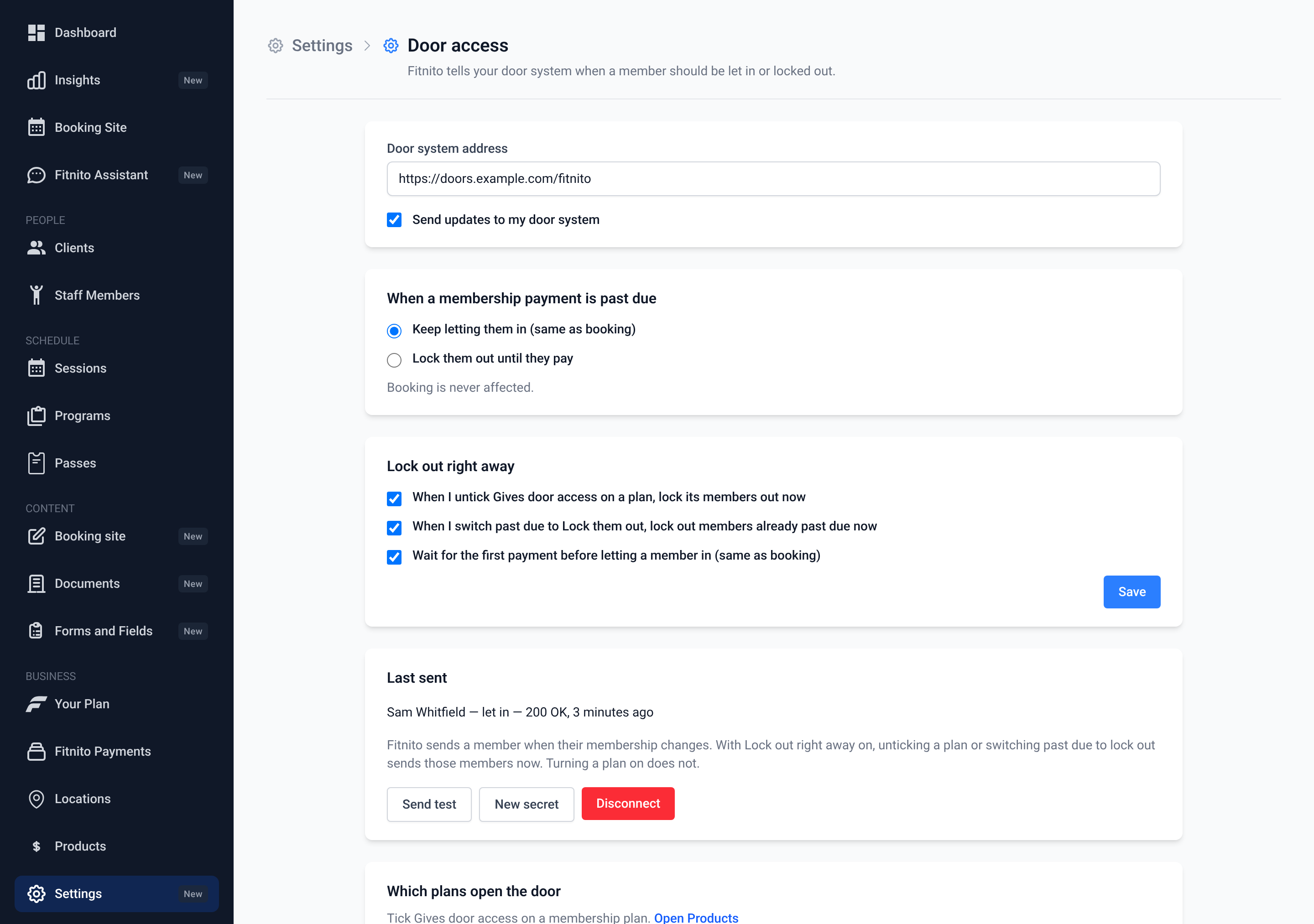
Settings → Door access.
How door access works
Tick the plans that open the door
Every membership plan has a Gives door access box. Off until you tick it.
Fitnito keeps the door in sync
When a membership starts, pauses, cancels, goes unpaid, or the first payment goes through, Fitnito tells your door system to let them in or lock them out. Booking is never affected.
Your rules for late payments
Keep letting past-due members in (the default, same as booking), or lock them out until they pay. They're let back in when the payment goes through.
Lock out right away, or not
All three are on by default. Turn off any of them in Settings.
- Untick a plan's box and its members are locked out now.
- Switch past due to lock out and members already past due are locked out now.
- Wait for the first payment before letting someone in, same as booking. A member in a trial or waiting on a later first charge gets in once that payment goes through.
Connect your door system
Fitnito does not control the lock. It tells the door system you already have.
Paste the https:// address your door provider or developer gives you. Fitnito shows a secret once. Hand it over.
Every update is signed (Standard Webhooks) and retried if it fails. Send test shows the reply, and
Last sent shows the last member sent. One door system per gym. Owners and admins set it up.
Step-by-step: Door access help
What it doesn't do yet
- Members who already have a membership are sent the next time it changes. Ticking a plan doesn't send anyone.
- Visit packs don't open the door.
- One door system per gym.
- Disconnect stops updates. Anyone already let in stays let in on your door system.
Door access FAQ
Does Fitnito have door access tied to memberships?
Yes, on a paid plan or the trial. Tick Gives door access on a membership plan. Members on that plan are let in while their membership is active and locked out when it's paused, canceled or unpaid.
Can I lock out members who haven't paid?
Yes. Unpaid and canceled memberships are always locked out. For past due, you choose: keep letting them in (the default) or lock them out until they pay. They're let back in once the payment goes through.
Does a new member get in before their first payment?
Not by default. A member who pays through Fitnito is let in once their first payment goes through, same as booking. You can turn that off to let them in while the membership is active or in a trial.
What happens when I stop a plan from giving door access?
By default, everyone on that plan is locked out right away. Turn that off and they're locked out at their next membership change instead.
Does door access change who can book classes?
No. Booking is never affected.
What door system does it work with?
One that can receive a signed update at an https:// address. Your door provider or developer gives you the address, and Fitnito sends a signed let-in or lock-out update for each member. Fitnito does not control the lock. It tells the door system you already have.
Is door access on the free plan?
No. Door access is Premium: paid plans and the trial. Starter gyms see an upgrade prompt.
Your door, your rules.
Start free. Door access unlocks on a paid plan or the trial.
Get Started Free